



This warning comes from the APT package manager and the MySQL repository. It means the signing key is sitting in the old central keyring, /etc/apt/trusted.gpg, which apt still reads but has deprecated.
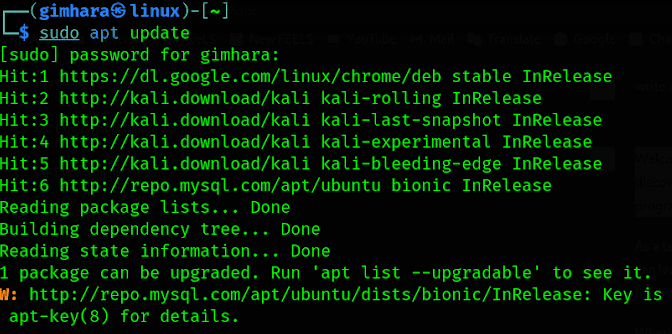
The quick fix
Go to the /etc/apt folder and list its contents. You should see a file named trusted.gpg:
cd /etc/apt/ls
Copy that file into the trusted.gpg.d directory, confirm it landed, and update again:
sudo cp trusted.gpg trusted.gpg.dcd trusted.gpg.dlssudo apt update
The warning is gone. Worth knowing what this actually did, though.
Why apt complains in the first place
Anything in trusted.gpg or trusted.gpg.d is trusted for every repository on the system. That is the problem apt is warning about. A key you added for one vendor's repo can sign packages claiming to come from any other repo you have configured.
The copy above moves the key out of the deprecated file, which stops the warning, but it keeps that system-wide trust. It is the right move if you want the message gone now. It is not the arrangement apt is steering people towards.
Scoping the key to one repository
The modern approach is Signed-By, which binds a key to the single repository that should be allowed to use it. Since APT 2.4, /etc/apt/keyrings is the recommended home for keys that are not managed by a package.
In a classic one-line source, the key goes in brackets before the URL:
deb [signed-by=/etc/apt/keyrings/mysql.gpg] http://repo.mysql.com/apt/debian/ bookworm mysql-8.0
In the newer deb822 format it is a field rather than a bracket:
Types: debURIs: http://repo.mysql.com/apt/debian/Suites: bookwormComponents: mysql-8.0Signed-By: /etc/apt/keyrings/mysql.gpg
Note that apt-key is deprecated for this and should not be used to add keys any more. And if you are wondering why the key is scoped this narrowly: it is the difference between trusting one vendor to sign their own packages and trusting them to sign anything at all.